Telegram Group Member Adders: What They Do and What They Risk
Telegram is also a place to build communities and promote a business, so group size matters to many owners. Therefore, many people seek to increase the number of members in their Telegram groups promptly and effectively. One of the solutions that comes to mind is Telegram group member adder.
Table of Contents

What is a Telegram group member adder
Types of Member Adders

How Telegram group member adder find members?

How do Telegram group member adders add members to groups?

Why adder "anti-spam tricks" do not make these tools safe

Let’s Build Your Community the Right Way!
Short answer: A Telegram member adder is a tool that takes users from other groups and tries to add them to yours from a logged-in account. Privacy settings can block those adds, and unwanted adds can get the account limited. Use an invite link for people who want in. Buying members only raises the count.
What is a Telegram group member adder?
Telegram group member adders are tools or services which are automated to carry out the adding of members to Telegram groups. These adders range from simple scripts to desktop apps and browser extensions that use Telegram's client API from a signed-in account to add members in bulk.
These tools collect user IDs or phone numbers from public groups or databases, then try to add those users to your group. The goal is a bigger member count in a short time. A bigger count does not bring engagement by itself.
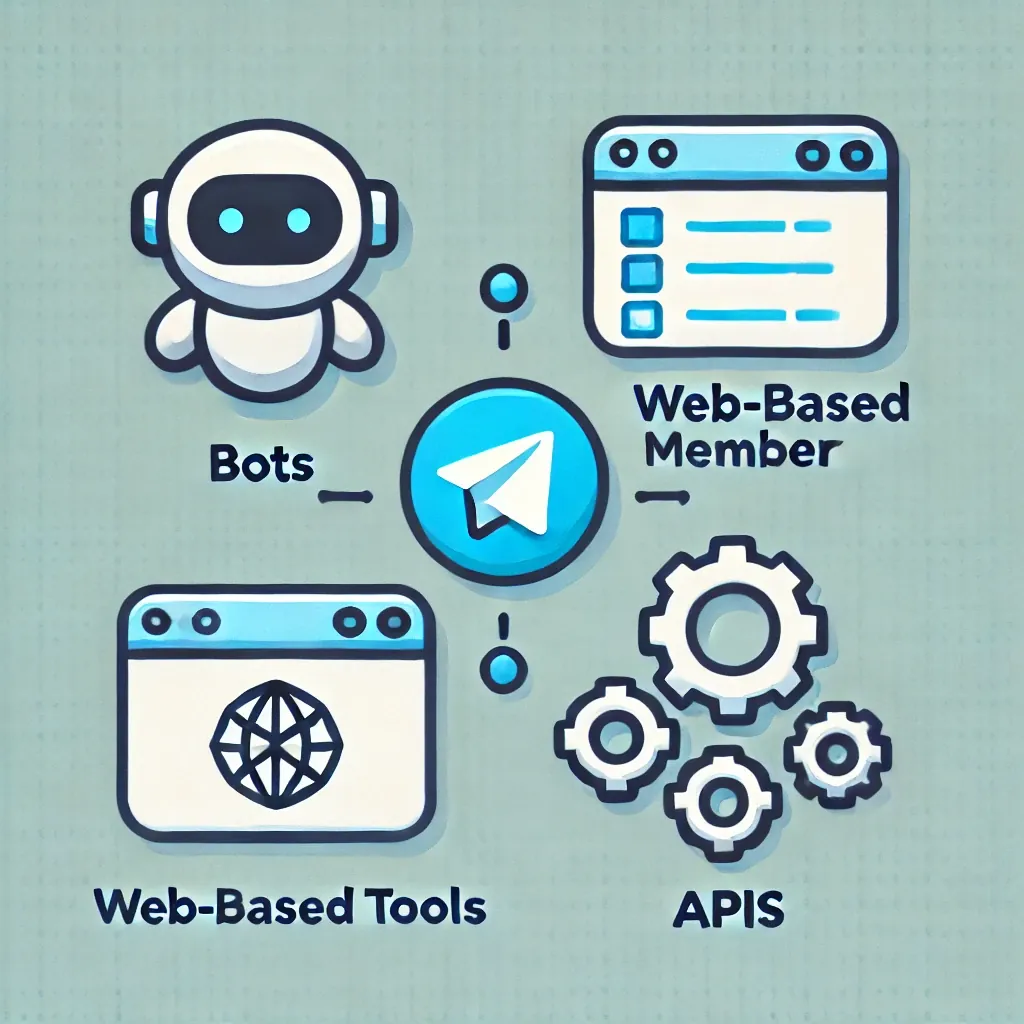
Types of Member Adders
Bots:
Bots are automated Telegram accounts. The official Bot API has no method for adding a user to a chat, so a "member adder bot" usually works by sharing invite links or by running a user account behind the scenes.
Web-Based Tools:
Online platforms that provide interfaces for users to manage and add members without the need for programming knowledge.
APIs:
The Telegram API provides developers with the possibility to create custom solutions for managing group memberships programmatically thus allowing them to add users, send messages and automate various group management tasks.
How Telegram group member adder find members?
Member adders need a list of people to add, so they pull personal data from a variety of sources. The simplest field is the user ID. Phone numbers, usernames, display names and profile pictures can also be collected when available.
Extracting User Data from Telegram Groups or Channels
The primary method would be to extract the user IDs directly from Telegram groups or channels, especially from those that have a target audience similar to the one you are in search of.
Accessing the Target Group or Channel:
The extraction tool (usually a script signed in as a user account) can either join or access a public group or channel. It is mainly utilized for public groups, as their member lists are frequently disclosed.
Scraping User Data:
Once the tool is inside the group, it first scans the members' list and then begins extracting the information of users. The underlying reason is here is to gather the user IDs (the distinct figure that is assigned per each Telegram account.)
Other data that the Telegram group member adder can get includes:
Usernames: Public Telegram usernames.
Display Names: The names users choose to show publicly.
Profile Pictures: In some cases, profile pictures might be scraped.
This data then goes into the tool's target list.
Creating a List of Extracted Users:
The tool or bot saves a list of all the retrieved data of users and usernames after scraping. Such lists may contain hundreds to thousands of user IDs, and these lists can also be targeted. Adding many users in a short time also runs into Telegram's flood limits and raises the chance that someone reports the account.

Extracting Phone Numbers from External Sources
Tools, besides extracting user Ids from Telegram, may focus on getting phone numbers from different websites, databases, or social platforms. These phone numbers are used to add users to Telegram groups.
Sources for Extracting Phone Numbers
Public Databases and Websites:
Tools can scrape the phone numbers from publicly available sources, such as business directories, forums, or any website, where people have published their contact information.
Purchased Databases:
Marketers or companies are able to purchase phone number databases from other sellers. The lists are made up of numbers that result from marketing programs, online sign-ups or email subscription.
Social Media Scraping:
In some medias like LinkedIn or public profiles of people’s Facebook, users might publish their phone numbers to the public, and the tools can then scrape that information and use it later on.
Other Sources:
Phone numbers can also be harvested from e-commerce websites, job boards, or online forums where people explicitly share their contact information with the purpose of networking or inquiring about sales or services.
Issues with Phone Number-Based Adding
Privacy Violations:
A lot of users might get the feeling of their privacy being violated when they are included in the group without their consent.
Telegram Spam Detection:
Adding people in bulk from a phone list invites spam reports, and Telegram can limit an account after a report is upheld.
High Dropout Rate:
People are added to the group through mobile numbers, and if they get in without knowing or agreeing with the rest of the group, they tend to leave the group.
Creating Fake Accounts Using Virtual Numbers
A third strategy for including users is creating fake Telegram accounts by means of virtual or temporary phone numbers and then adding these accounts to groups.

How Fake Accounts Are Created
Virtual Phone Numbers:
Bots utilize virtual or temp phone numbers (often obtained from online services) to register a large number of fake telegram accounts. Many of these accounts are registered automatically. Telegram's spam FAQ says certain virtual or VOIP numbers can be limited before the account sends anything.
Generating Fake Profiles:
As soon as the accounts are created, the bots allocate to each of them a randomized username, profile picture, and a minimal profile information.
Proxies & VPNs:
These bots use proxy servers or VPNs to open multiple accounts and try to avoid detection. That gives no assurance the accounts will last.
A panel is a different thing: see what a proxy free panel for Telegram is.
Using Fake Accounts to Boost Group Size
Bulk Adding:
When the fake accounts are created, the Telegram groups are then filled with them in bulk to increase the number of members artificially.
Simulating Activity (Optional):
Some bots also pretend to be real accounts by simply doing some activities like viewing posts or making generic comments. However, this interaction is superficial and is not real.
Risks of Using Fake Accounts
Lack of Engagement:
Fake account never engage with the group’s content, thus the group might have the largest number of members, but there is no meaningful interaction.
Telegram Bans:
Telegram can limit or ban accounts that break its rules, which lowers your count when they go. Its Terms of Service also mention channels being restricted for violations.
Damaged Credibility:
Genuine people are sometimes able to figure out the fact that the group is crowded by fake members, which may have an impact on the credibility of either your group or your brand.
How do Telegram group member adders add members to groups?
Telegram group member adders use several approaches to add members to groups, We will explore some of these methods.
Direct Adding via Telegram API
Tools that add people directly use Telegram's client API, signed in as a user account, to send add requests to Telegram's servers. Here’s how it works:
Accessing the Group
First, the signed-in account needs access to the group where members will be added. It must be an admin of the group or have permission to add members.
Using API Methods
channels.inviteToChannel and messages.addChatUser: These are the client API methods used to add members to supergroups, channels and basic groups. The Bot API has no equivalent. Here’s how these commands work:
- The tool sends a request to Telegram's servers with the group's identifier and the users to add.
- Telegram servers handle the request, adding the specified users to the group.
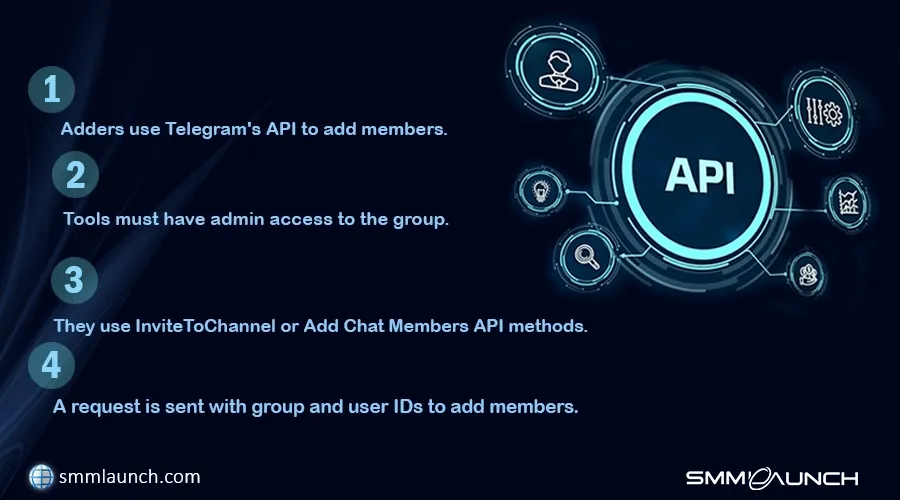
Process Flow
- Send API Request: A request is issued to Telegram’s API to add the extracted users.
- Server Processing: Telegram processes the request. If the user’s privacy settings permit, they are automatically added to the group.
- Response: The tool gets a success or failure message from Telegram, which signifies either the user was added successfully or some error (privacy restrictions or rate limits) occurred.
What might be confusing is that a username is different from a user ID:
Username: Optional and publicly visible (@paul_doe448).
User ID: Unique number assigned to every Telegram user (123456789), which isn’t immediately visible but is essential for interaction through the API.
Inviting Members Using Invitation Links
If privacy settings forbid the direct addition of a user (for example, when users have settings that block auto-adding), the next option is to send group invitation links. Here’s how that works:
• Generating Invitation Links: The bot or tool sets up invitation links for the group.
• Sending Invitations: Through the use of either the API or the automatic messaging systems, the bot sends these invitation links to users, usually via private messages or through other communication channels like SMS, email, and other Telegram groups.
Users can accept or ignore the invitation, so fewer of them join. Telegram's FAQ warns against sending invite links to strangers: they can report you, and your account can be limited. Share links only with people who expect them.
If you only need to add people you know, the built-in way is simpler and safer: see how to add members on Telegram step by step.

Virtual Numbers and Fake Accounts
In some cases, Telegram member adders use virtual numbers or fake accounts to increase group membership. This process involves creating temporary or fake accounts with virtual phone numbers, which are then used to populate the group.
- Creating Fake Accounts: Using virtual phone numbers from online services, bots can create multiple Telegram accounts. These accounts are then added to the group to artificially inflate membership numbers.
- Risks: Telegram's spam FAQ says certain virtual or VOIP numbers can be limited before the account sends anything. Accounts that break Telegram's rules can be limited or banned, and any that disappear lower your member count.
Why adder "anti-spam tricks" do not make these tools safe
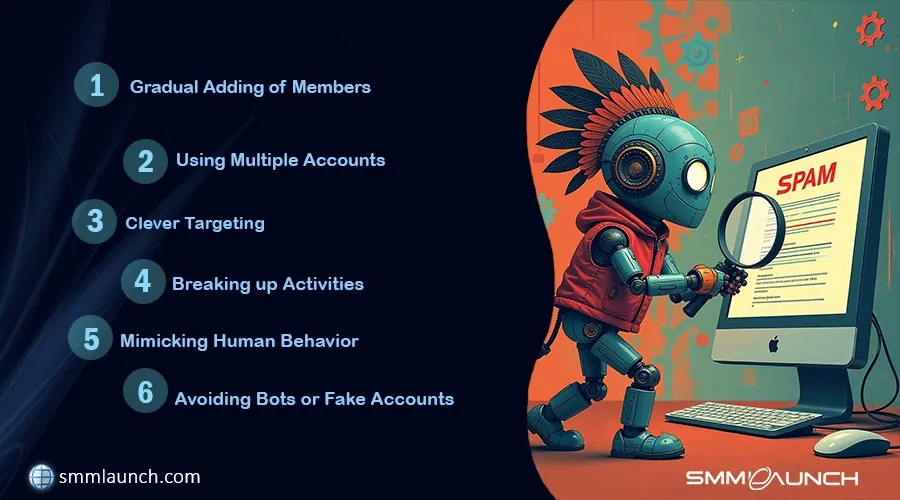
Adder tools advertise several tricks to make added members look more “natural”. None of them removes the risk, because Telegram's limits follow reports reviewed by moderators, and an unwanted add can be reported however carefully it was paced.
Gradual Adding of Members
Random intervals may reduce flood errors, but the person added can still report the account.
Using Multiple Accounts
Spreading the work across several accounts with proxies or VPNs adds no security. It only means more accounts are exposed to limits.
Clever Targeting
Picking users from similar groups may reduce annoyance, but they still did not ask to join yours.
Avoiding Bots or Fake Accounts
Using older accounts is a common adder tip. Telegram publishes no rule that older accounts are exempt, and an older account can be reported like any other.
Mimicking Human Behavior
Some tools imitate human actions. That does not change what a moderator sees in a spam report.
Breaking up Activities
Breaks between tasks may reduce flood errors. They do not make an unwanted add welcome.
Can a Telegram bot add members?
Not through the official Bot API. The Bot API has no addChatMember method. A bot that is an admin can create invite links (createChatInviteLink) and approve join requests (approveChatJoinRequest), but it cannot pull a user into a chat. Even unbanChatMember does not bring someone back: the docs say the user "will not return to the group or channel automatically".
Direct adding sits in Telegram's client API, which runs from a signed-in user account. The invites documentation names messages.addChatUser for basic groups and channels.inviteToChannel for supergroups and channels. So a tool that promises direct adding needs a user account behind it, either yours or one the tool controls. That account carries the risk.
Why do member adder tools fail on so many users?
An adder cannot change what Telegram allows. It sends a request for each user, and Telegram can refuse. These are the errors Telegram documents for channels.inviteToChannel, plus its general flood error:
- USER_PRIVACY_RESTRICTED: the person's privacy settings do not allow the add. Users choose who can add them under Settings, Privacy and Security, Groups & Channels. Telegram's docs say to share an invite link with them instead.
- USER_NOT_MUTUAL_CONTACT: the person is not a mutual contact of the adding account.
- USER_CHANNELS_TOO_MUCH: the person is already in too many channels or supergroups.
- CHAT_ADMIN_REQUIRED: the adding account must be an admin in that chat.
- USER_KICKED: the person was kicked from this chat.
- FLOOD_WAIT_X: too many attempts. The account must wait X seconds before trying again.
Channels have one more limit. Telegram's FAQ lets the owner invite only the first 200 subscribers, as explained in our guide on how to add members to a Telegram group or channel. After that, people join through a link or search.
Telegram publishes no success rate for any of this, so a percentage on a tool's sales page is that seller's own claim.
Why do accounts get limited or banned?
The main trigger is people, not only speed. Telegram's spam FAQ says people report strangers who contact them, then adds: "The same applies to adding people to unwanted groups and channels." Moderators review reports, and if they agree, the account is limited.
Here is what Telegram says follows:
- What a limit does: a limited account can message only people who saved its number as a contact, and reply to anyone who writes first.
- How long it lasts: a first case is "most likely" limited "for a few days or so". Repeated offences bring longer blocks, and someone who keeps writing to strangers "may lose the ability to do so forever".
- New accounts: some numbers, including "certain virtual/VOIP numbers", can be limited before the account sends anything. That matters for tools built on virtual numbers.
- Promotional links: the same FAQ says people mind "anything related to commerce or online popularity". The channel FAQ warns that if strangers report your channel links, you "may be banned from contacting other people, however good your intentions".
The Terms of Service add two lines to read before using a scraper. Users agree not to send spam, and Telegram says it "additionally prohibits data scraping", in terms that "apply to all users, businesses, and third-party services".
The documents above give no safe number of adds per day. Slow pacing may reduce flood errors, but it does not stop an annoyed person from pressing Report. If you believe a limit is wrong, Telegram's route is @SpamBot.
One more rule: do not install cracked adder software. A tool that adds members signs in as your account, so a modified build from an unknown source is handling your login.
Invite link, adder tool or bought members: how do they compare?
Prices below are per 1,000 members as of November 2026. They change, so check the live price list before you order.
Invite link or direct add (built into Telegram)
- Cost: free.
- Who joins: people who choose to follow the link, or contacts you add yourself.
- Limits: a channel owner can add only the first 200 subscribers directly. Groups hold up to 200,000 members, and channels have no subscriber limit.
- Risk: low when people expect the invite. Sending links to strangers can still get you reported.
- Useful extras: links with an expiry date, a usage limit or admin approval. The steps are in our add members guide.
Adder tool
- Cost: varies by tool, and we have not priced them. The bigger cost is the account you put at risk.
- Who joins: users from a list who did not ask to be there. Many can leave as soon as they notice.
- Limits: every error listed above, plus the 200 limit on channels.
- Risk: high for the adding account, because each unwanted add is a chance to be reported.
Plain bought members
- Cost: from $0.14 per 1,000 (service ID 1, labelled Euro, order 100 to 60,000). The general service, ID 199, is $0.17 (order 100 to 60,000), so 5,000 members on it cost $0.85.
- Who joins: non-premium accounts. Our price list names these services "Fake Members", and you should take that literally: they do not read, reply or buy.
- What you paste: your channel or group link. Your own account does no adding, and you need no member list.
- Risk: the count can drop, and low activity next to a high count is easy for visitors to spot. Telegram's rules still apply to your channel. The description of ID 199 lists a 90-day warranty, so read it and ask support what it covers.
- Where to order: buy Telegram members.
Premium bought members
- Cost: $0.94 per 1,000 for a 3-day service (ID 155, order 10 to 150,000), or $3.29 per 1,000 for a 30-day service (ID 931, order 100 to 133,000). So 5,000 members on the 30-day service cost $16.45.
- Who joins: accounts with Telegram Premium. You are not buying the subscription itself. Our guide to Telegram premium members has the background.
- Risk: as with plain members, they raise the count and do not replace readers. Short periods cost less because they cover less time.
- Where to order: buy Telegram premium members.
Which option should you pick?
- You already have an audience somewhere else: use an invite link. Put it in your site footer, bio or video description, with a separate link for each source.
- You know the people and have fewer than 200 subscribers: add them directly, following the step-by-step guide.
- You want to screen who joins: turn on admin approval on the invite link.
- A new channel looks empty and you accept that you are buying a number: place a small order at the minimum, see how it holds, then decide. Do it alongside real posts.
- You want readers or customers: neither an adder nor an order brings them. Content and cross-promotion with similar channels do that work.
- You resell Telegram services: the same services are available through our API.
Frequently asked questions
Can a Telegram bot add members to a group?
Not through the official Bot API, which has no addChatMember method. A bot that is an admin can create invite links and approve join requests. Tools that add people directly use Telegram's client API from a signed-in user account, and that account is the one exposed to reports.
Can a member adder get my Telegram account banned?
Yes, it can lead there. Telegram's spam FAQ treats adding people to unwanted groups as reportable. Moderators can limit a reported account, usually for a few days the first time, with longer blocks for repeat offences. Accounts that keep contacting strangers can lose that ability for good.
Is there a free Telegram member adder?
Telegram's own invite link is free and, shared only with people who expect it, does not expose your account the way an adder does. You can also add contacts directly. Free adder tools are listed in app stores and on GitHub, but a free download does not lower the risk to the account that does the adding.
How much does it cost to add 1,000 Telegram members?
With an invite link, nothing. On SMMLaunch as of November 2026, plain members start at $0.14 per 1,000 and premium members at $0.94 per 1,000 for a 3-day service, or $3.29 for a 30-day one. Prices change, so check the services page.
Are fake Telegram members worth buying?
Only if a higher visible count is all you want. Fake members do not read posts, react or buy, and the count can drop. They can make a new channel look less empty, but they carry risk under Telegram's rules and do not replace real content.
What is the difference between adding and buying members?
Adding pushes specific users into your chat from an account you control, so that account takes the reports and limits. Buying means you paste your link and a provider's accounts join. Your account does no adding, but those members are there for the count, not to read.
Let’s Build Your Community the Right Way!
To wrap it up, a “Telegram group member adder” looks like a quick way to grow a group, but it puts the adding account at risk of limits or bans, and it takes time and effort to run. For people who want to join, an invite link is free and does the job. If you only need a higher count, SMMLaunch sells member services where your own account does no adding.
Be clear about what that buys. Bought members raise the visible count. They do not read, react or buy, the count can drop, and Telegram's rules still apply to your channel. Use them, if at all, alongside content and promotion that bring real readers.
Related Articles

The Lazy Guide: Let a Telegram Bot to Get Group Members Take Over!

3 Powerful Benefits of Using Telegram Adder Scraper Members Tools

4 Critical Risks of Scrape Telegram Group Members

How to Add Members to the Telegram Group: 3 Effective Methods